When Claude Code, Codex, OpenCode, Qwen Code or Copilot CLI asks permission for a tool call, the island opens on a card that shows exactly what Allow authorizes (Antigravity, Cursor, Factory Droid and Kimi Code are the exceptions, below):
- the agent’s own words for it, when it gives them (Run the test suite, then the linter);
- the whole command, file or URL, not just the tool’s name. A long command shows in full (up to four lines, then it scrolls);
- for an edit, the lines it adds and removes (+12 −3). Codex patches show their files and counts too.
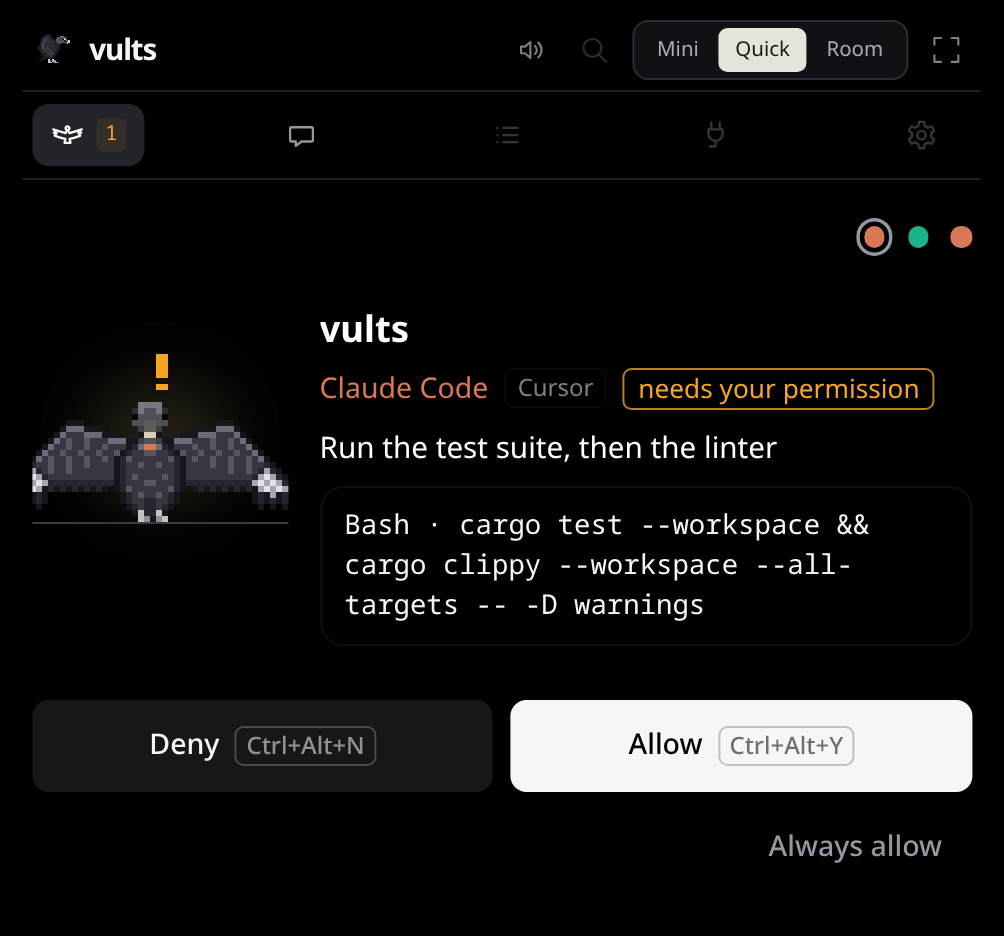
The card takes the whole width of the island until you answer. Then it says what happened for a moment (Allowed in green, Denied in red) before the next thing shows.
Answering#
- Allow and Deny answer the agent directly; it carries on at once.
- Under the command, one line says why it asks when there is more to it than “nothing allows it”: Destructive: no policy ever allows it, or Your policy asks first for this.
- Ctrl+Alt+Y and Ctrl+Alt+N do the same from anywhere, without leaving your window (shortcuts). The buttons show the keys actually bound. A shortcut only answers a card on screen; with nothing waiting, it does nothing.
- In the Nest, the card is answered where you are: while its window has the focus, the island stays aside and the session’s card on Flock has the same buttons (and takes the same keys). Leave the Nest with a card waiting and the island comes up for it.
- In Panel mode the island is out of sight, so a card also shows as a desktop notification. Its Open brings the island up on the card; it has no Allow or Deny (notifications).
- While the app is Paused (presence) no card shows: the agent asks in its terminal at once, and neither Always rules nor policies answer.
- Always allow allows the request and every identical one from then on: the same agent, tool
and exact command, file or URL, in the same project folder.
cargo testdoes not covercargo test && rm -rf build, nor the same command in another project. Those requests are answered without a card, and the step says always allowed; an identical request already waiting is answered too. Settings → Approvals lists every rule, and Remove takes one away. A command of more than one line, or over 300 characters, offers no Always allow: a rule would only see its start. - A destructive command (
rm -rf, a forced push) always asks: its card says so in orange, makes Deny the bright button, outlines Allow in red and offers no Always allow. No rule or policy ever answers it, even a rule saved before. - Only you answer: with a click or a shortcut now, or earlier with Always allow or a policy you accepted. No timer or default ever approves anything.
Policies#
A policy answers cards for you: you write it in Settings → Approvals → Policies, see it as a diff against the one in place, and accept it with a click. One policy per project folder, plus one for everywhere; a newer one replaces the older. Revoke turns it off at once, and its cards ask again. For now a policy allows only Claude Code’s calls, the one agent whose cards show the whole call (the others’ shells run in a folder the card leaves out); for Codex, OpenCode, Qwen Code and Copilot CLI it can deny or ask. Agents whose permissions get no card (Antigravity, Cursor, Factory Droid, Kimi Code) are not answered by one. Zeca’s chat follows them only when you choose Your policies or Full access for it (Who answers Zeca’s cards).
# Lines that start with # are notes.
project ~/Projects/site
agents claude codex
allow read
allow write
allow command git status
allow command git diff *
deny external
ask tool WebFetchprojectsets the folder it holds in (and below); without it, it holds everywhere.agentslimits it to some agents; without it, every built-in agent.allow,denyorask, then a class (read,read-external,write,external),commandand its words (a last*lets more words follow), ortooland a tool’s exact name (a shell or an MCP tool only withdenyorask).- A destructive action (
rm, a forced push, a redirect over a file) always asks: no line can answer it. - A deny beats an ask, and an ask beats an allow, across every policy that holds; a deny beats an
older Always allow too. A
denyoraskline covers whatever follows its words,*or not, and a command holding its first two words anywhere (git --no-pager push, or a baregit push, underdeny command git push origin main) is never allowed. It names one program:deny command curlsays nothing aboutwget.deny tool Bashstands for every agent’s shell. - An allow needs Vults to know what the action does: an MCP tool, an unknown tool or command, an
interpreter, a build or a test (
cargo testruns the project’s code) always ask, and so do the git commands that run the repository’s hooks (commit,merge,rebase,pull,push,checkout,switch,cherry-pick,revert,am,worktree,clone). So does a command with a shell symbol, quote, glob or tab, a long or multi-line command, and a card whose target is cut. Always allow still covers one exact command. - An allow reaches only the session’s folder: the one Vults saw it start in, never
/or your home folder, and nothing once the agent moved out of it (a session Vults first saw later, after a restart, gets no allow). A path outside it, one that climbs (..), several paths in one target, or a write under.gitasks. An allowed command’s words name no absolute path, URL,@file,..,.gitor option glued to a path, so a fetch with a URL always asks. - A broad line covers all its class:
allow externalcoversgit push,gh pr merge,gh workflow run,gh gist createand other actions beyond this computer Vults knows, including ones that send a file from the folder out;allow writecovers every known write that can be undone. Prefercommandlines. - An answer by a policy shows no card; the step says allowed by your policy, and the audit log names the policy’s consent (Safety).
- Editing a policy so it names another folder revokes the one you edited when you accept; the review says so.
- What it can’t see: links. A symlink inside the folder that leads outside it reads as inside. And
allow writelets the agent change files that run later, when you or a tool run them (aMakefile,.envrc,package.json’s scripts). A policy is a row in your local database: another program running as you could add one, as it could change any of your files.
More than one at a time#
Requests wait in line, each for its own agent. The card shows the first one with 1 of 3, under a dot per session in its agent’s color. Answer one and the next comes up.
To answer one further back first, click Open on its notification (in Panel) or its bird in the corner widget: its card comes to the front, keeping its own deadline. Muted and hidden projects (per project) still get their cards and sounds.
A question half answered starts over when another card comes in front of it. A card whose agent moved on is not brought forward, but a subagent working in parallel does not take a card away. When one agent asks for two calls at once, answering the first leaves the second waiting.
When nobody answers#
A request waits as long as its agent does (a little under two minutes); meanwhile the terminal says Waiting for your answer in Vults. During the last 30 seconds the card counts down, Goes back to the terminal in 0:25, and then the terminal asks as if Vults were not there. If you answer in the terminal instead, the card says so and goes away.
While it waits, a card climbs a ladder, so a card you missed reaches you:
- It opens the island, with its sound (in Panel, with a desktop notification too, if notifications are on).
- Its sound plays again at 45, 75 and 105 seconds.
Do not disturb (Settings → General, for 30 minutes, 1 hour or 4 hours) silences the sounds and notifications of everything at rest, and this ladder’s reminders, until it ends by the clock (a suspend does not stretch it). A moon in the island’s header says it is on; a click on it ends it. A card still opens the island with its sound (and in Panel its notification): nothing hides a card an agent is waiting on.
If the app is closed or not responding, the hook answers nothing within milliseconds and every agent asks in its terminal as usual.
Claude Code’s auto mode#
In auto mode the classifier clears most requests in a blink, so the island only shows a card, plays a sound or opens for a request still waiting after a moment. The same goes for “finished”: only a session that stays done is news.
Questions#
When Claude Code or OpenCode asks you something with choices (Claude Code’s AskUserQuestion tool,
OpenCode’s question tool), the island opens on a question card:
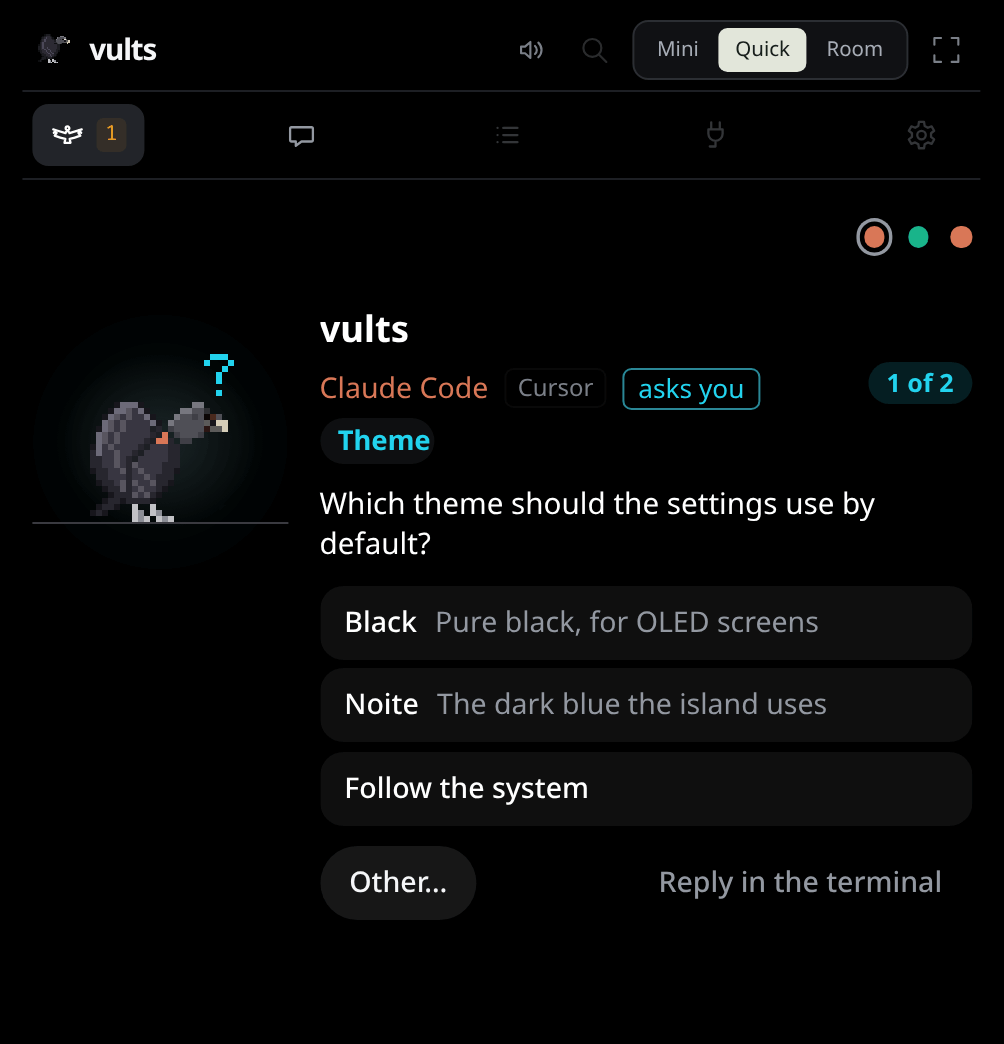
- One question at a time, with its tag (Theme) and 1 of 2 when it asks several.
- A click on a choice answers it. When several may be picked, tick them and press Next (or Send on the last one).
- Other… opens a field for your own words; Enter sends it, Escape goes back.
- Reply in the terminal puts the question back in the agent’s terminal. Until then, or until the card runs out of time, Claude Code waits for the island.
- Ctrl+Alt+Y and Ctrl+Alt+N never answer a question.
This needs Claude Code 2.1.85 or later and hooks installed by this version. Older hooks show Update available in Settings → Agents; until you update them, the island shows the question and takes you to the terminal, as it does for Qwen Code.
OpenCode#
OpenCode’s permissions and questions get a card through the plugin Settings → Agents → OpenCode writes (checked with OpenCode 1.18.35 and 2.0.26). OpenCode’s own prompt stays up meanwhile: answer on the island or in OpenCode, and the first answer wins; the card goes away when you answer in OpenCode.
- Allow is OpenCode’s Allow once; Deny its Reject. Always allow is a Vults rule: OpenCode’s own Always, which would change its settings, is never used.
- Some questions stay in OpenCode’s prompt: all of them in OpenCode 2, which lets no plugin answer them, and in OpenCode 1 those with more than four choices or more than four at once. The island shows that one waits there.
- With no click in time, the app closed or an outdated plugin (Update plugin… in Settings → Agents), OpenCode simply waits in its own prompt.
Qwen Code#
Qwen Code’s permissions get a card through the hooks Settings → Agents → Qwen Code installs (checked with Qwen Code 0.25.0). Qwen reads the same answer as Claude Code, so Allow, Deny and Always allow work as they do there.
- While the card is up, Qwen shows only its spinner; with no click in time, or the app closed, it asks in its own prompt.
- Its questions (
ask_user_question) stay in its terminal: Qwen takes no hook answer to them. The island shows that it waits there. - Cards come up in Qwen’s default approval mode (Shift+Tab in Qwen, or
qwen --approval-mode default); a new install starts in auto, where its own classifier decides. In yolo Qwen approves everything, so no card comes up.
Copilot CLI#
Copilot CLI’s permissions get a card through the hooks file Settings → Agents → Copilot CLI
writes, ~/.copilot/hooks/vults.json (checked with Copilot CLI 1.0.96). Copilot reads every file in
that folder, so the one Vults writes holds only its own hooks; a file there that Vults did not write
is never touched.
- Allow and Deny answer that one call; Always allow is a Vults rule.
- An edit’s card shows the lines it adds and removes; a new file shows as a write.
- With no click in time, or the app closed, Copilot asks in its own prompt.
- It has no question tool, so no question comes to the island.
- A failed command shows as a failure; what a tool printed never leaves the hook.
Agents that ask in their own prompt#
Antigravity, Cursor, Factory Droid and Kimi Code ask their permissions in their own terminal or prompt, and the island never answers them: their birds show the steps. What each agent can do sums them up, and each one’s section there says why it has no card. A task Vults runs on Kimi Code asks with a card for each write and command, as any task’s agent does (Tasks).