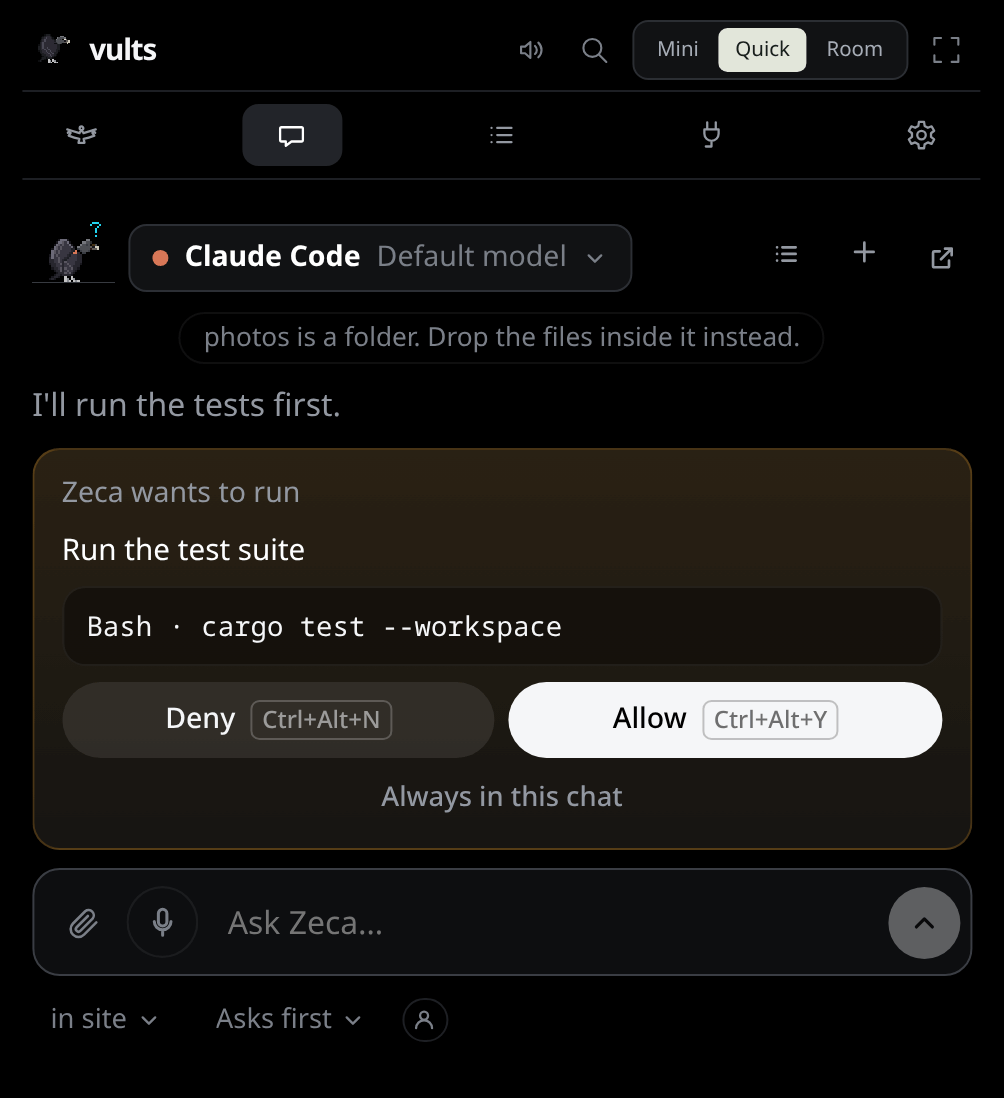
Open the Chat tab, choose Chat… from the tray icon, or drop a file on the island. Zeca sits at the start of the conversation (small at the top of the island’s chat, large in the Nest’s): he thinks while the reply comes, tilts his head when he asks you something, and swallows the files you give him. Pick Claude or Codex at the top (or the API provider you set up, see below); on the island it is one pill, ● Claude Code · Default model ▾, whose menu holds the engine, the model and the effort. Its engines come in two groups, Your setup (the Claude Code and Codex CLIs, each Signed in, Installed or Not installed: Vults only looks whether the CLI and its login file are there, never reads them) and Vults harness (the API, Ready with a key or a local model), with Engines in Settings › under them. New (+ on the island) starts a fresh conversation, and so does switching to another provider; the one before stays in the list (see Conversations). Esc closes the chat from anywhere in it; the conversation is still there when you come back.
The chat is Zeca’s: with him turned off (Settings → Flock & Zeca → Zeca) there is no chat, no microphone and the talk shortcut does nothing, and files dropped on the island are not taken. See Without Zeca. On KDE Plasma the desktop keeps Ctrl+Alt+V for the app meanwhile; to use the key elsewhere, clear Hold to speak to the chat in System Settings → Shortcuts; the talk key then stays off until you give it a key there again.
Where it works#
Before the first message, the folder (in vults ▾, at the top in the Nest, under the composer on the island) says where the conversation will work: the folder of the session in front, unless you pick another one of the sessions on the wire, or an empty folder of its own. Once the conversation starts it stays there until New.
Model and effort#
Beside the folder (on the island, in the pill at the top), Default model ▾ picks the model and how hard it thinks, for Claude and for
Codex. Claude offers Opus, Sonnet and Haiku (Claude Code’s names for the latest of each); Codex
lists the models your own codex offers, asked the first time you open the picker with Codex.
The effort goes from Low to Max, with only the ones the chosen model takes. Default
leaves either to the CLI, as your own settings set it.
The choice is remembered per folder and per engine: a new conversation in that folder starts with it. Like the folder, it is fixed once the conversation starts, so a reply never changes model midway; New starts another. The API chat’s model is chosen in Settings → Chat & voice.
The Nest#
The arrow at the top of the island’s chat opens the Nest, Vults’ own window. Its Chat tab is the same conversation, wide, with replies in full Markdown; its cards are answered there too. Memory, beside it, shows what Zeca remembers.
Continuing a session#
/continue <words> gives your words to a Claude Code or Codex session in the conversation’s folder
that stopped in the last ten minutes, as its next turn: Vults resumes it here, with its own
settings, in its sandbox, and it shows in the flock again with its cards. Only a
session whose process is gone: one still open in its terminal is refused, so you tell it there.
One at a time; /continue stop ends it. Like /task, it goes to no model of Zeca’s.
Tasks#
/task keeps a task and /delegate starts one on an agent, both sent to no model: see
Tasks.
Conversations#
Every conversation is saved on this computer as it goes, and the list button at the top of the chat shows them, the latest used first, with the engine and folder of each. Click one to go on with it where it stopped, even after a restart: it keeps its engine, folder, model and effort, and its CLI resumes its own session (Claude Code’s session, Codex’s thread; the API chat replays what was said, with each file sent kept only as a label: a text file by its name, a document by its title, an image as “an image”, never the contents). The pencil renames one; the cross deletes it after a second click, with what was said in it.
What is saved is what the chat shows: your messages and the names of the files you sent, Zeca’s
replies, errors and stops; never a card’s answer (the audit log keeps those) and never an
Always in this chat rule, so a conversation opened again asks as a new one would. The newest 200
are kept, in the same local vults.sqlite as the activity history; Settings → Activity →
Clear history removes them all. A conversation whose folder is gone can’t be opened again.
What Zeca knows#
Each message carries, before your words, a <today> block with the date and time on this computer
and a <flock> block with a line for each session the island shows (up to 12, then “and N more”):
its agent, its project, its state and the step it is on (secrets redacted), never the command a
card asks about. It goes to whoever runs the chat, the CLI’s provider or the API’s, with the
message.
With the memory on, what Zeca remembers and recalls joins as well: see Zeca’s memory.
Writing and reading#
- Enter sends, Shift+Enter starts a new line. You can type the next message while a reply comes, and send it when the reply ends. ↑ in an empty composer brings back your last message, to change it or send it again.
- While Zeca answers, the send button becomes Stop: it ends the turn there, and anything the turn was waiting on is a no.
- The reply streams in as it is written. Scroll up to read and it stays where you are, with a ↓ new text button to jump back to the end.
- Copy under the latest reply copies all of it, as the Markdown it was written in; an older reply shows it when the pointer is over it. A code block has its own Copy.
- A turn that fails says why, with Try again: it sends the same words and files once more.
- While a turn runs, Thinking… says so, with its seconds once it takes longer than three.
- In the Nest the conversation reads in one column as wide as the composer, however wide the window. Each reply is signed with Zeca and the engine that wrote it, and a code block names its language.
Speaking instead of typing#
Turn it on once in Settings → Chat & voice → Voice: download a model (Base is 60 MB and quick; Small and Large v3 Turbo understand accents and names better). A mic appears in the composer (by the send button in the Nest, by the paperclip on the island).
- Click the mic and speak. It stops by itself after about 1.5 s of quiet after your words, or when you click again; the words land in the input for you to read and fix, then Enter sends them. Silence before you start never stops it; if a pause does, click again to go on.
- Or hold Ctrl+Alt+V from anywhere: the chat opens and Zeca listens while you hold it (pauses never stop it); letting go turns it into text. The key can be changed in System Settings → Shortcuts.
- Esc while it listens throws the recording away. A recording stops by itself after a minute.
- Language you speak follows your system’s; pick another, or Detect it each time. A fixed language is far more reliable on short phrases. Base is weak outside English: in Portuguese use Small, or Large v3 Turbo with a GPU.
Only your speech goes to whisper: a small speech detector (Silero VAD, under 1 MB) cuts the silence around it, so whisper makes no words up there. It downloads by itself while voice is on and it is missing; until then the mic only stops on a click. With a GPU (Vulkan: AMD, Intel or NVIDIA) a sentence takes a fraction of a second and a dimmed preview of your words shows as you speak; on the processor, pick Base.
Everything happens on this computer: whisper.cpp transcribes the audio in memory, and the audio is never saved or sent anywhere. The models and the detector are checked against their known SHA-256 before they are used.
What it may do#
- It reads files in that folder freely.
- Every command and every edit shows up in the conversation as a card like the island’s own: what Zeca means to do, the whole command or the file with its +/− lines, and Deny and Allow side by side with their keys (Ctrl+Alt+N / Ctrl+Alt+Y answer it from anywhere). Nothing runs until you answer, and a card nobody answers is a no.
- Once the conversation has read content from outside (a web page or search, a command that ran
curlorgit pullorgh, an MCP tool other than those ofvults-zeca, the server Vults gives the chat’s Claude Code), every card after it says so in red: a page can carry words written to steer Zeca, so read what the card asks with care. Only a call that ran counts (a denied fetch read nothing), building and testing never do, and it holds for the rest of that conversation, also when it is opened again from the list. A new conversation starts clean. - Always in this chat allows that exact call again (the whole command and input, not the card’s text) without a card, until the conversation ends: New, another engine, or Zeca turned off. A card that can’t name the call whole has no such button. Each time the rule answers, the chat says Allowed for this conversation and the audit log keeps it. Rules are never saved.
Who answers Zeca’s cards#
Settings → Chat & voice → Who answers Zeca’s cards chooses, for every conversation, at once:
- Asks first (the default): a card for each call, as above.
- Your policies: the policies you accepted answer the chat’s calls as they answer Claude Code’s on the island. A deny denies, an allow allows (Claude Code’s calls, inside the conversation’s folder), the rest asks.
- Full access: everything runs with no card, but a destructive command (
rm, a forced push) still asks, what a policy denies is denied and what a policy asks first still asks. Once the conversation has read content from outside (a web page, a fetch, an MCP tool), its cards ask again until it ends: a page’s words could be steering it. Adddenylines to a policy for what must never run.
The chat says each answer given this way (Allowed by your policy, Denied by your policy, Ran with full access), and the audit log keeps it. Its chip, beside the model (red with full access), shows the choice; from there you can only give access back. More access is given in Settings.
Files#
Click the chat’s paperclip to pick files, or drag one over the island and drop it on the zone where Zeca waits with his bill open. Either way he swallows it, a vulture carries it across while a bar fills, and it joins your next message: a chip over the input (× takes it off). Click the input to write about it. You can send it with no text to ask what it is. Images, PDFs, code and text work best. Files are copied into the app’s inbox (up to 20 MB each) and deleted after a week; a folder, or a file over 20 MB, is refused with a line saying why.
Your subscription, your login#
The chat runs the claude or codex command you already logged into, so it uses your own
subscription and Vults never reads your credentials. Both stream the reply as it is written:
Claude through claude -p, Codex through one long-lived codex app-server.
Your setup#
The chat reads your own Claude Code and Codex setup, as in your terminal: your CLAUDE.md, skills,
MCP servers, hooks and allow rules (a person icon at the top says so). A project’s own settings and
.mcp.json servers join only in a folder you already trusted in Claude Code; its CLAUDE.md is
read either way. Your allow rules apply in every folder. Cards still ask whatever your rules don’t
allow, whatever defaultMode your settings set, and your hooks never make the chat show up as an
agent session.
Turn it off in Settings → Chat & voice → Your Claude Code and Codex setup, and Claude reads none of it; Codex then only leaves out your hooks. The switch applies to the next conversation. Worth knowing:
claude -pskips the trust prompt, so a repository you just cloned can’t bring rules or hooks of its own.- An allow rule such as
Bash(npm test:*)runs a cloned project’s test script with no card. - With the switch off, Claude gets no MCP servers but Vults’ own, and no saved rule skips a card.
- Codex’s
config.tomlstill brings its MCP servers, and itsAGENTS.mdis still read. - A conversation already running keeps what it read.
See Safety for the rest.
Without a CLI: an API key, or a local model#
The chat can also use a provider’s API with your own key, or a model running on your machine. In Settings → Chat & voice, pick the Provider, paste its key, and choose a Model; the provider’s name then appears at the top of the chat, next to Claude and Codex.
| Provider | Key | Notes |
|---|---|---|
| Anthropic | sk-ant-… | Claude Opus 5.5 until you pick another model |
| OpenAI | sk-… | |
| Google Gemini | AIza… (Google AI Studio) | |
| OpenRouter | sk-or-… | One key for hundreds of models |
| Groq, DeepSeek, Mistral, xAI | their own | |
| Ollama | none | Must be running on 127.0.0.1:11434 |
| LM Studio | none | Its server must be on, at 127.0.0.1:1234 |
- The models are listed live from the provider. Each provider keeps the model you chose for it.
- A key is kept in your system keyring, is never shown again, and is only sent to its own provider; Remove deletes it. Usage is billed to your account with that provider.
- This chat can’t run commands, edit files or look around your project. It reads what you type and
the files you drop (images, text up to 512 KB, and PDFs with Anthropic), and calls tools when a
question needs them: the flock tools (your sessions, the cards waiting, your plans’ usage, your
GitHub card),
recallandmemory_proposewith the memory on, and the web tools with the web on. What a tool returns goes to the provider (commands with their secrets redacted); it never answers a card. - Reasoning models that think out loud only show their answer: the
<think>part is hidden and never sent back. - A conversation keeps the provider and model it started with.
- With Anthropic, a request Claude declines on safety grounds is retried on another Claude model within the same call; if that one declines too, the bubble says so.
The web#
With Settings → Chat & voice → Web for Zeca on, the API chat can search the web and read pages. Searches go to Brave Search or Tavily with your own key (kept in the keyring), or to a SearXNG you run. Off, the model is never offered either.
A page is untrusted, so the chat’s model never sees it: a separate call to your API provider, with no tools and told the page is data, reads it for the question, and only that answer comes back. A search’s titles and snippets do reach the model, marked untrusted. Pages are read only from public addresses. Each search and page is a request on your behalf with a daily cap (Safety), and the conversation then counts as having read from outside.