Connectors put news from outside services on the island. Each one is off until you switch it on in Settings → Connectors.
GitHub#
Every five minutes it checks, and every minute while CI checks are still running:
- your open pull requests: checks failed or passed, approved, changes requested;
- pull requests where your review is requested;
- the checks on the default branch of the ten repositories you own that were pushed most recently, and the latest release of each.
The same single query also brings what Room’s Connections tab shows of each row: a pull request’s branch, size, reviewers and last update, and each check by name (The Nest). Releases are only listed there: never an alert, never on the island.
It uses the GitHub CLI you are already logged into (gh auth login), so Vults never sees a token.
The first check only learns how things are; alerts start with the next change. Click an alert to
open it on GitHub, × to dismiss it. Passing checks replace a failure, and a newer review decision
the older one.
After an error it tries again in 15 minutes for a GitHub rate limit, 10 when gh is missing or
signed out, and 4 to 15 (doubling) otherwise. Opening the island or the card checks sooner when the
last check is over a minute old, except under a rate limit. GitHub is checked at most 3,000 times a
day; past that, Settings → Connectors says Budget spent. A repository GitHub cannot answer
for (say, behind SAML sign-in) leaves the rest showing.
The GitHub card#
Once GitHub has answered, the open island’s Connections tab shows its card, with a chip for GitHub and a card per row:
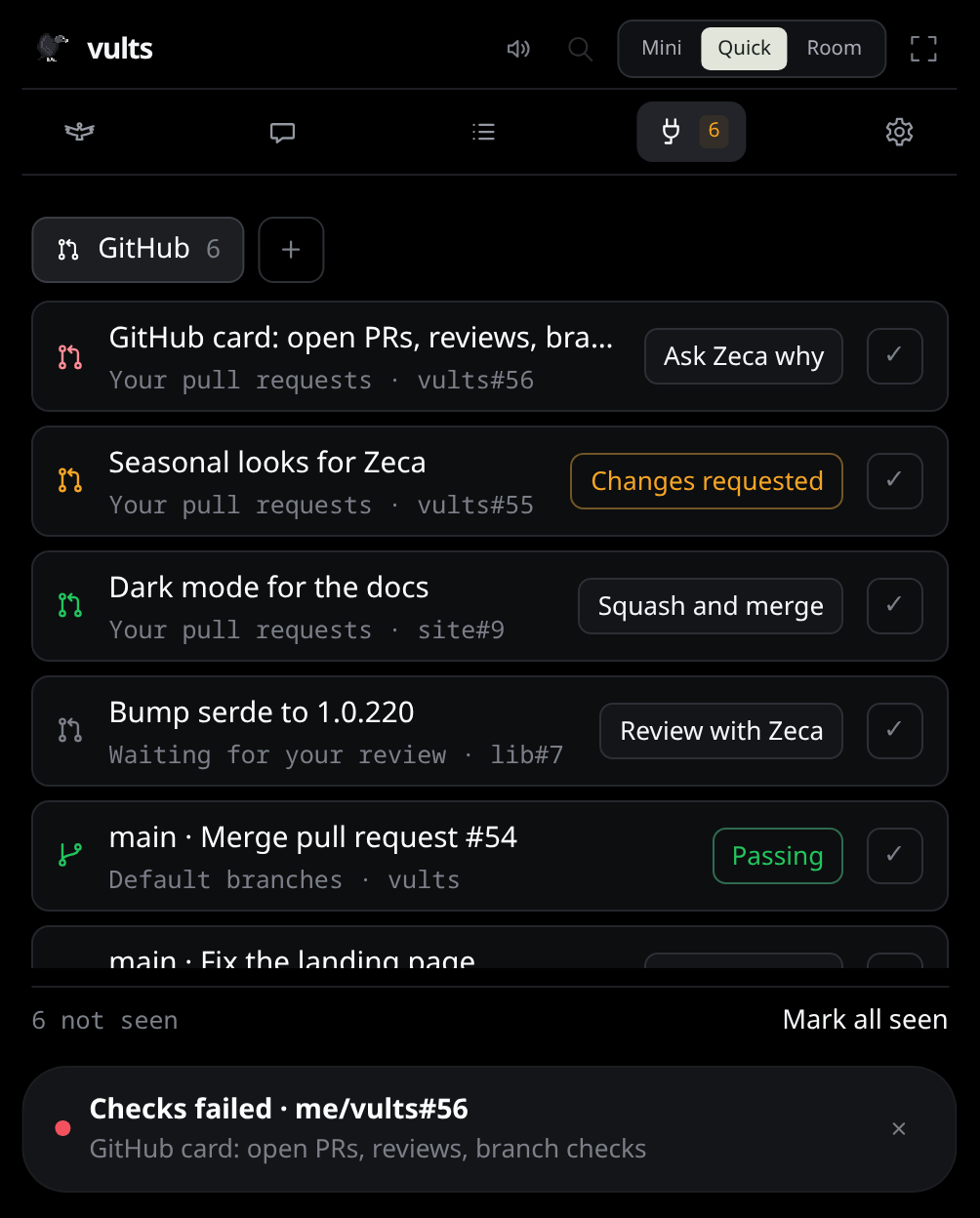
- Your pull requests, most recently updated first: a dot for the checks (green passing, amber running, red failing) and the review (Approved or Changes requested);
- Waiting for your review;
- Default branches: the latest commit on each, with how its checks went. Repositories without checks are left out.
Click a row to open it on GitHub. When a pull request is merged or closed, or a review request withdrawn, its alerts go with it.
With Zeca on, a row can ask him about it:
- Review with Zeca, on a review waiting for you: he reads the diff and tells you the risks before you approve;
- Ask Zeca why, on failing checks: he reads only the failed step’s log and tells you what broke and where.
Each opens the chat with the question written in the composer. Nothing is asked until you send it, so you can change it first.
Squash and merge sits on your own pull request once it is approved and its checks pass. The
first click only asks, under the row, what the second will do; Merge then squashes it into its
base branch and deletes its branch, through your gh login, and the card asks GitHub again, so it
leaves with the next answer. It merges only the commit the card showed green: if someone pushed
since, GitHub refuses. If GitHub refuses (a branch rule, a conflict), the row says why. Each merge writes a line
in the local trace, and nothing else is merged on its own.
✓ marks a row seen: it leaves the island, and the tab’s count, until it changes (its checks, its review, or a branch’s latest commit), and stays in the Nest’s Connections. Mark all seen clears the card at once. Which rows you marked is kept on this computer only; GitHub never hears of it.
When a check fails, the card keeps what it last saw and shows when it last updated, and the error. While a permission card waits, the Connections tab is dimmed until it is answered.
What the last check saw (the titles, links and check states the card shows, nothing else) is kept
in connectors/github.json in the app’s data folder (~/.local/share/vults/ on Linux), so a
restart does not alert again about old news.
Want another service? See Adding a connector.