The island hangs from the top edge of your screen. On KDE Plasma, Hyprland, Sway and other compositors with layer-shell it sits above every window like a panel; on GNOME it is a regular always-on-top window. On X11 it shows on every workspace. It takes the keyboard only while you type in the chat, or after Ctrl+Alt+Space (below).
With more than one screen, the desktop picks one (usually the focused screen at start). To pin the island to a screen, choose it in Settings → General → Screen. If that screen goes away, the island moves to another one and comes back when it returns.
On Windows (a preview build) there are no global shortcuts, desktop notifications, Open terminal or tray presets yet.
The flock#
Each agent session is one bird, a vulture. A project is a species: all its sessions share it, and it keeps it every time the app starts. A small band at the base of each neck shows the agent: orange for Claude Code, teal for Codex, pink for OpenCode, indigo for Qwen Code, blue for Copilot CLI, and violet for any other tool (Antigravity, Pi, Cursor…).
Zeca is not a session: he sits on the wire when nothing runs, and he is the one you talk to in the chat. The session in front (the one that needs you, the one you clicked, or else the first to arrive) takes his spot. Every other session is a vult.
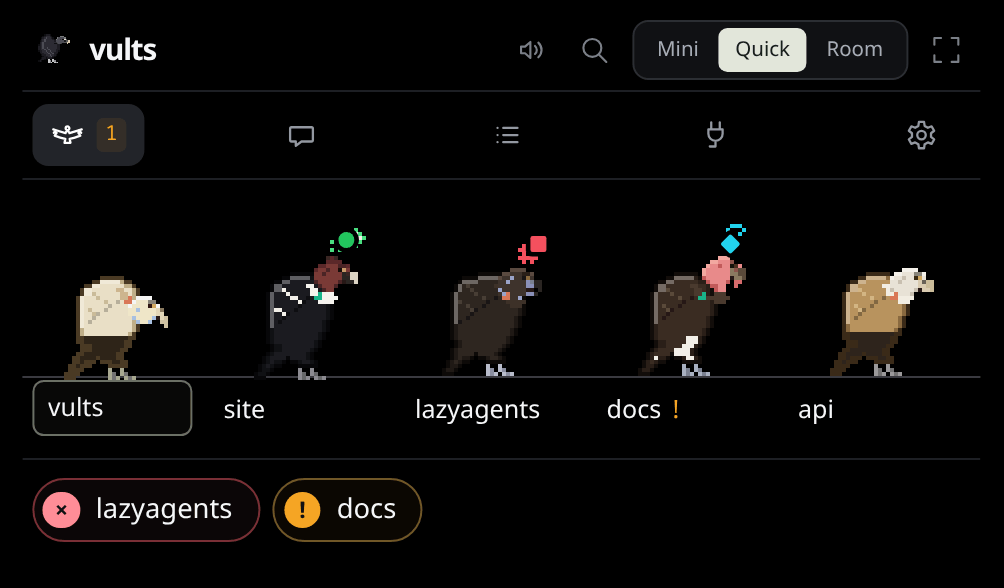
The birds act out what their sessions do: they read, peck the wire while editing, take off for the web, and spread their wings when a permission waits (with a mark over the head; at dawn the resting birds open theirs to the sun, with no mark). New sessions fly in (one a task of yours started takes off from Zeca’s place on the pill, or from the bird in front when one sits there); ended ones fly off. Reduced motion keeps them on their perches. Settings → Flock & Zeca picks the species pool, Zeca’s species and the rare visitors. Animations lists every clip.
Zeca’s seasonal looks#
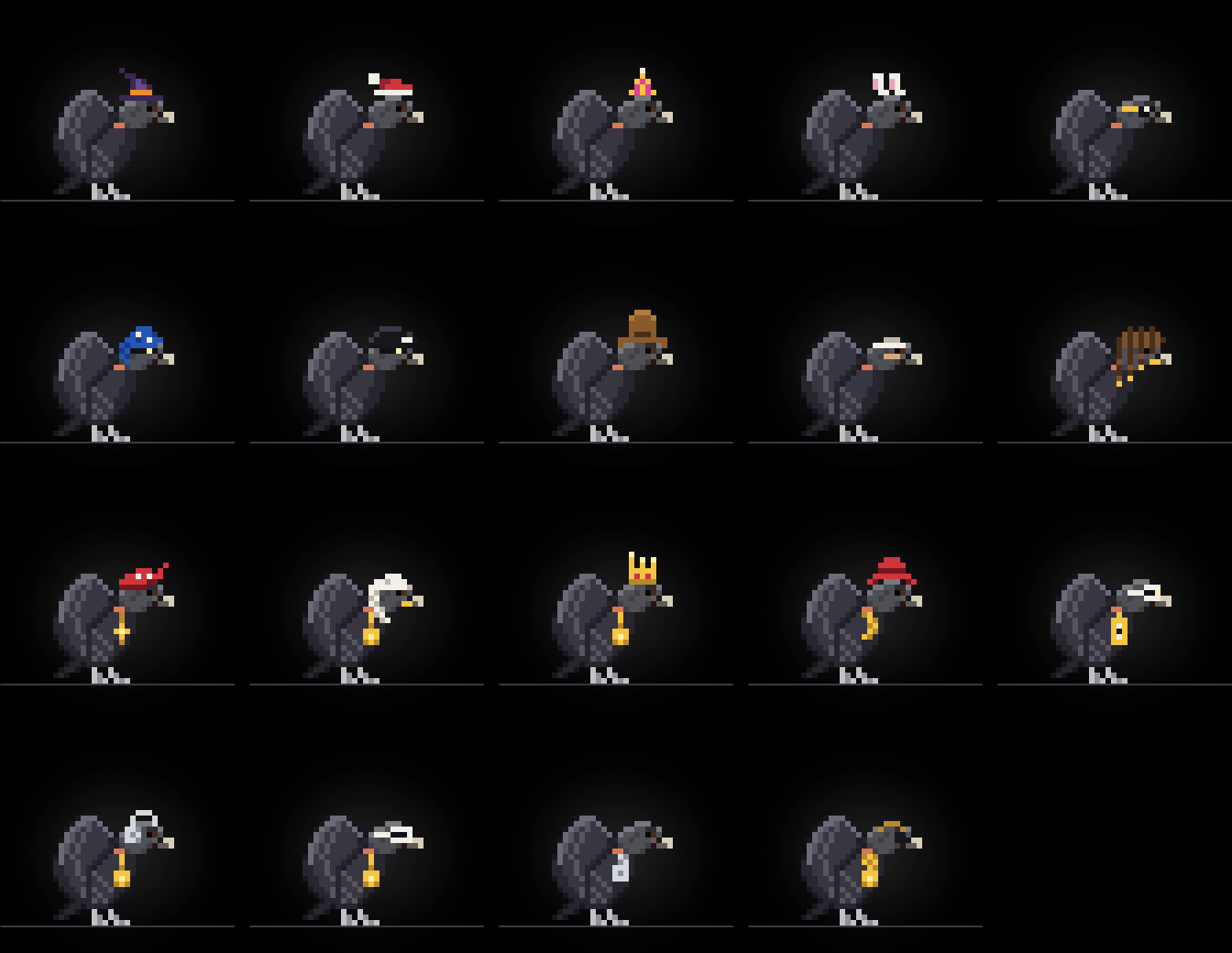
Zeca dresses for the season: a witch hat in October, a Santa hat in December, a party hat at New Year, bunny ears at Easter, by your computer’s date. Settings → Flock & Zeca → Look (with Zeca drawn beside it: in the look you pick, in his own feathers on Auto) keeps one look all year, or none, and adds sunglasses and fourteen outfits with no season. Right-click Zeca on the island to pick one in place: he wears whatever the pointer rests on, a click keeps it, Escape leaves him as he was. Only Zeca wears them.
Without Zeca#
Zeca is optional. Settings → Flock & Zeca → Zeca turns him off; the flock keeps working: sessions on the wire, permission and question cards, the Allow / Deny shortcuts, notifications, connectors and the presets. What goes with him:
- The chat, its tab, files dropped on the island, the Nest’s Chat, the tray’s Chat…, the microphone and the talk shortcut. The usage meters stay: they read your agents’ subscriptions.
- His hello at start-up.
- His place on the wire: the session in front sits there as its own bird, and with nobody running the pill reads Nothing running.
Turn him back on in the same place; no restart either way.
Compact, open and hidden#

Compact (the size switch’s Mini), the island is a small pill with no text, only the flock: Zeca on the left with the session in front, up to eight vults spread along the wire, and under it a hairline per plan showing its usage, in the usage meters’ colors (amber from 70%, red from 90%). For sessions, colors mean the same everywhere: amber for a permission, cyan for a question, green when done, red when it failed. A vult in one of those states wears a badge of that color, and of its own shape, so no state rests on color alone: a triangle for a permission, a diamond for a question, a circle when done, a square when it failed. While someone needs you the pill’s edge pulses amber; when a session failed (and nobody needs you) it stays red; a cyan dot at its corner says a connector has news. Rest the pointer on a vult and it looks at you (one in the air comes down); click it to open the island on its session, right-click it for its quick actions. Connector news waits in the open island.
Click anywhere else on the pill to open the island. It folds back 15 seconds after the pointer leaves (a thin line at the bottom counts down; coming back cancels it). The size switch at the top right changes how much you see, keeping what you were looking at: Mini folds it to the pill at once, Quick is the island, Room opens the Nest on what the island shows (the flock, the chat, your connections or this week; Settings from the gear), and the full-screen button beside it opens it on the whole screen. While a card waits, it takes the flock’s place. Settings → General → Fold the island sets the wait.
With Settings → General → Open on hover on, resting the pointer on the pill opens it without a click. Opened that way, it folds as soon as the pointer leaves, unless you clicked in it. Off by default, and not in Panel.
Two things keep it open until you are done:
- A permission card. It opens the island by itself and stays until you answer. Nothing else opens it by itself: a session that finishes, fails or asks something plays its sound and gets its badge.
- The chat. The island never folds while you type.
With nobody on the wire for a minute, the island hides. Move the pointer to the middle of the top edge of the screen to bring it back.
Presence: how much it shows#
Settings → General → Presence, or the tray’s menu (Linux), picks one of four presets, at once.
| Preset | At rest | A card that needs you |
|---|---|---|
| Island (the default) | The flock at the top of the screen | Opens the island, with its sound |
| Panel | Nothing at the top; Zeca in the tray | Opens the island by the panel, with its sound |
| Quiet | Nothing, and no sound for finished or failed sessions or connector news. The top edge still brings the island back | Opens the island at the top, with its sound |
| Paused | A pill that says Paused | None: the agent asks in its terminal, as if the app were closed |
Nothing hides or quiets a card an agent waits on: not a preset (except Paused), not muting or hiding a project, not Do not disturb. The card opens the island and waits for your click.
Paused is for no interruptions at all: permissions and questions, including cards already waiting, go to the agent’s terminal, and your Always rules answer nothing. Connectors stop checking, and no desktop notifications show. Pick another preset to come back.
In the panel#
Nothing is drawn at the top of the screen. Zeca sits in the panel’s tray and shows the flock’s state: perched, working, wings open with an amber mark (something waits for you), green sparkles (done), a red mark (failed).
- Click him and the island opens in the panel’s corner. It folds once the pointer leaves, with Mini or Escape, and when you open Settings.
- Right-click him for the menu: Chat… (with Zeca on), Nest… (with Zeca off too), Set up agents…, the four presets (Linux), Quit.
- A card opens the island by the panel, and Zeca calls for attention in the tray until you answer. Allow and Deny are always clicks on the card.
- Connector news plays its sound but does not open the island: click Zeca to read it.
On KDE Plasma the island opens beside the panel that holds the tray; elsewhere at the bottom right. The tray needs a panel that shows StatusNotifierItems (Plasma does; on GNOME, the AppIndicator extension, where a left click may open the menu instead). Without a tray, start Vults again to open its settings.
In the other presets Zeca is in the tray too, with the same states and menu, and a click opens the island at the top.
The corner widget#
Settings → General → Corner widget puts a small window in a corner you pick; it is off until you pick one. It works with every preset. It shows up to three birds (the session in front, then the ones that want you most) and how many sessions need you or are working. An amber rim means someone needs you.
Click it to open the island, on the card when one waits. Click a bird to put its session in front first; if that bird’s card waits behind another, it comes first. The widget never answers a card.
It stays clear of panels and under full-screen windows. Without layer-shell it is an always-on-top window. It costs about 40 MiB of memory while it is on.
Desktop notifications#
Only in Panel, where the island is out of sight, Vults also uses your desktop’s notifications (any Linux desktop with a notification server). At the top of the screen the island already shows it all, so you are never told twice; Paused shows none.
They say when a session finished (with the first line of its reply), failed (with the error), needs you (a card waits), or has gone quiet. Each session has at most one, titled with its project; it goes away once the card is answered, the session works again, or it leaves (a finished session leaves the wire after 10 minutes, a silent one after 30). What happened while they were off is not raised later.
Open (or a click) brings up the island with that session in front. A notification never has Allow or Deny. Turn them off in Settings → General → Notifications.
The open island#
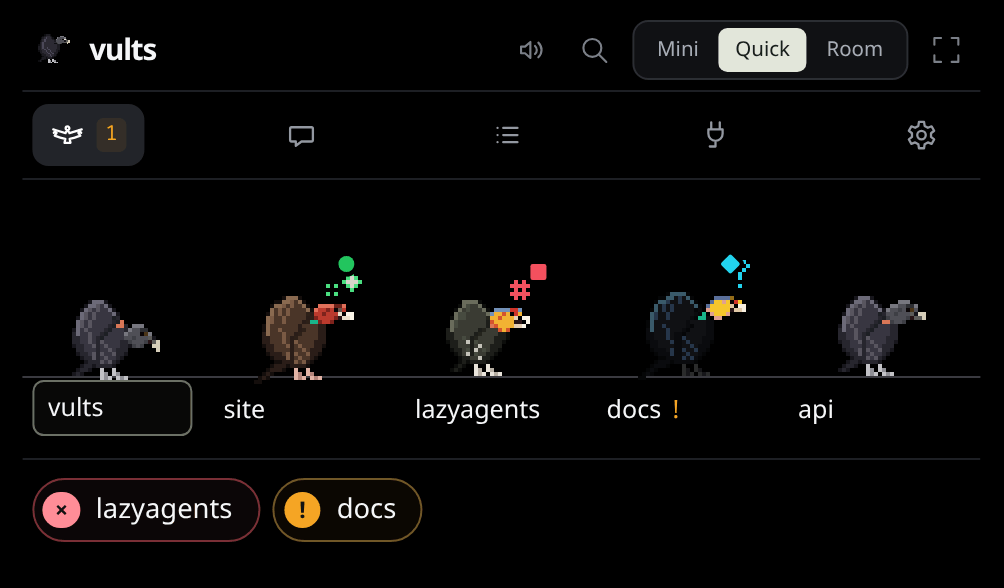
Open, the island’s header has its mark and name, a sound toggle, the search (the palette, as Ctrl+K), the size switch and the full-screen button. Under it, its five tabs as icons, as the prototype draws them:
- Flock, with how many sessions need you;
- Chat, Zeca’s, in a compact form: the engine and your conversations at the top, the composer with a paperclip (to hand Zeca files) and the microphone, the folder and model under it;
- Activity: this week, counted on this computer, its four figures and a bar per project (the most first; by day when no project is named), and ‹ Previous week / This week;
- Connections, with how many rows its connectors show and you have not marked seen: a chip per connector and a card per row, with Ask Zeca why, Review with Zeca, Squash and merge and ✓ (Connectors); with none on, + leads to the Nest’s Connections;
- Settings (the gear): Presence and Fold the island right there; its page list also draws Activity (the local history’s switch) and Flock & Zeca (Zeca’s switch and where the flock draws from) in place; any other page of Settings in the Nest, and All settings (at Agents while an agent’s hooks are missing or out of date, at General otherwise).
Over the Chat, Activity, Connections and Settings tabs, the chips of the sessions that need you stay under the tabs; one opens its session. Activity has Open in the Nest for the rest, and your tasks are in the Nest, Vults’ own window, with tabs of its own, which the arrow at the top of the chat also opens. The song and your plans’ usage take a line under the tabs. Below, the island’s whole width (about 500 px on screen, the size switch’s Quick):
- at rest, the flock: every session’s vult on one wire, twice its size, its project’s name under
it (boxed for the one in front) and
!when it needs you (up to six; past that, five stay and +N takes the last place, opening the Nest’s Flock, amber when one of them needs you), with its badge; rest the pointer on one for its project, agent and what it is doing. Under the wire, a chip for each session that wants a look: a card or a question, a failure, a bird gone quiet; - a session, once you click its vult or its chip: ‹ Flock goes back, and a dot per session,
in its agent’s color, opens another. A permission card opens here by itself and keeps its session
in front until you answer. On the left Zeca, large, with a glow and a mark in the color of the
session’s state (an amber
!for a permission, a cyan?, green sparkles when done, a red#when it failed, sweat at a usage limit); beside him the project, its agent and its state, and under both the session’s card.
| Session | Card |
|---|---|
| Working | Its project, the agent, steps so far, running subagents and, for Claude Code, ≈$1.37: what its tokens would cost at API prices (a subscription is not charged it), then the step just done and the current one |
| Idle | Waiting for the next prompt, and the last step |
| Needs permission | The exact command, file or URL, with Deny and Allow (Approvals) |
| Has a question | For a question the island can’t answer (Qwen Code, OpenCode 2): the question, and Open terminal. Claude Code’s and OpenCode 1’s questions get a card |
| Finished | The first paragraph of the agent’s last reply, OK and Open terminal |
| Failed | The error, OK and Open terminal |
A step reads like Editing main.rs, Running cargo build or, for an MCP tool, Calling github · list_prs.
A finished edit shows the lines it added and removed (Editing main.rs +4 −2). Click them to see the diff in place of the card, with line numbers when the agent sends them (Claude Code does; Codex’s diffs have none). × or Esc goes back. Diffs are kept for the session’s last eight steps, up to 400 lines each; a longer one says it stops short.
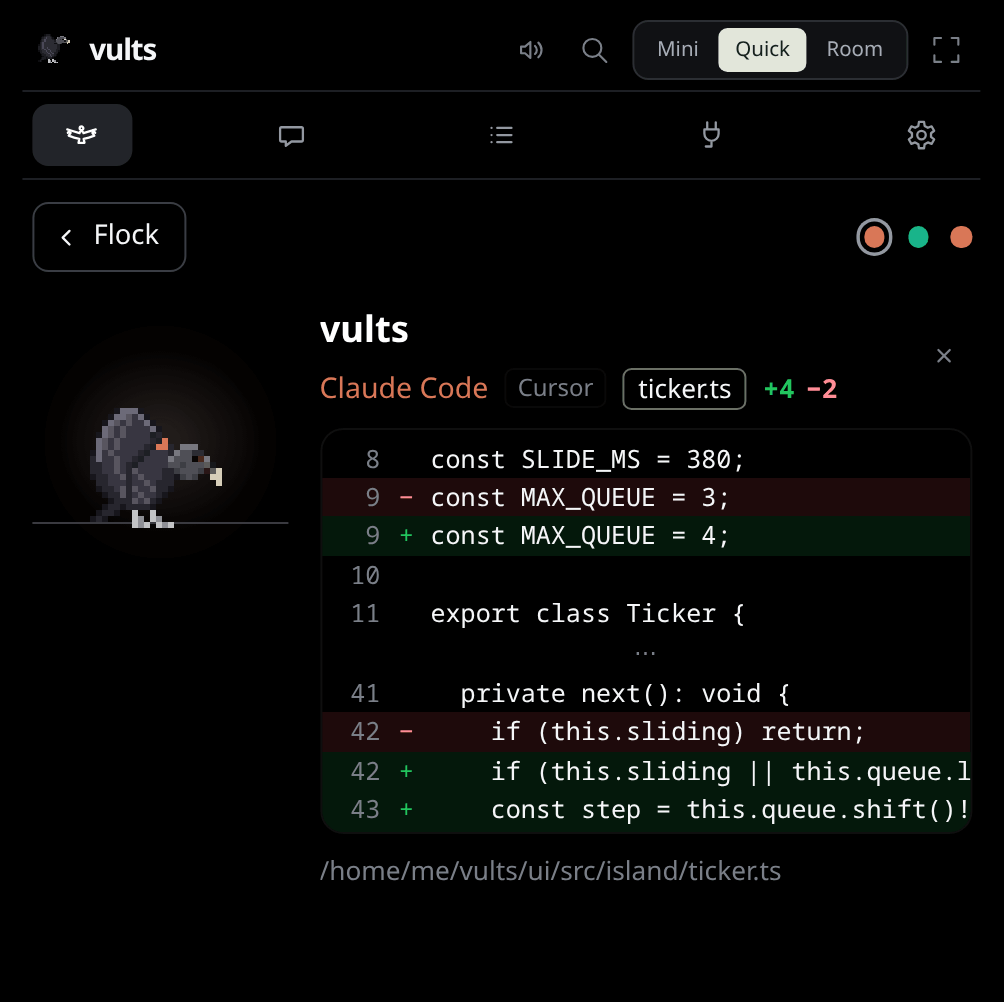
OK says you have seen it: the badge goes and the session shows as idle. With nobody on the wire, the card offers Ask Zeca.
Zeca notices you: he looks toward the pointer, preens if you rest it on him, and startles at a click. At start he says hello, by your first name when your user account has a full name (never taken from the network).
Now playing#
Turn on Settings → General → Now playing and the island shows the song your player is playing (any player that speaks MPRIS: Spotify, a browser tab, mpv). The compact island shows it when nothing runs; the open island shows it in the top bar, with previous, play/pause and next on hover. While it plays, Zeca dances and the flock’s idle birds court on the wire instead of soaring.
Subscription usage#
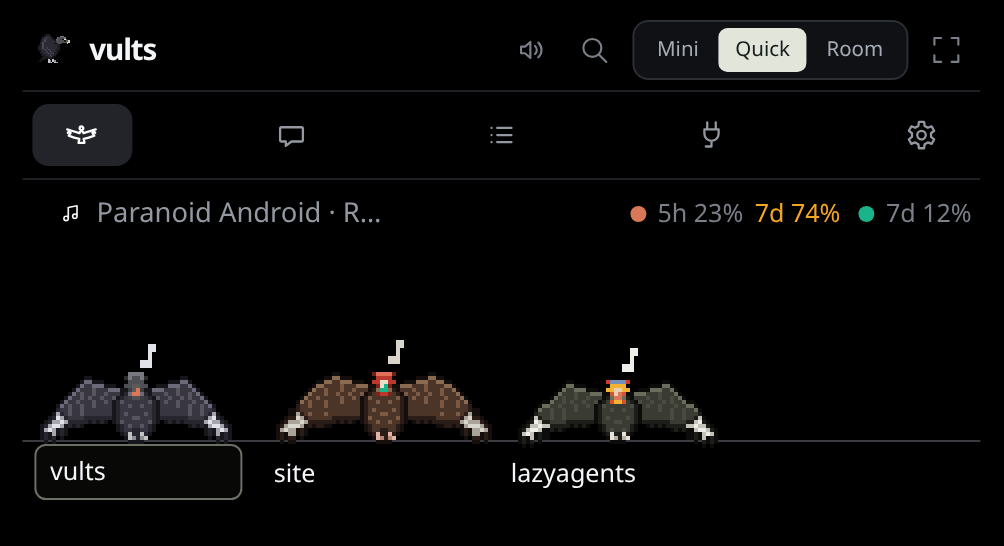
The open island’s top bar shows how much of your plans’ limits you have used, next to each agent’s dot: 7d 12% is 12% of the weekly window. It turns amber at 70% and red at 90%; hover to see when it resets. No token of yours is read: each number comes from the CLI you logged into.
- Codex: with Settings → General → Codex usage on, asked every 5 minutes, read-only, never while the screen is locked. It reaches OpenAI through your codex, so it is off on a new install.
- Claude Code (Pro or Max): it reports usage only to a status line, so installing the hooks adds one of ours, which runs yours if you have one (how). The numbers arrive after a session’s first reply.
Getting to a session#
Click a vult in the flock to open that session; it stays in front until you pick another or it leaves. A waiting card still comes first. With the keyboard (Ctrl+Alt+Space), ↑ and ↓ move between sessions: at rest the boxed name moves, in a session the next one opens.
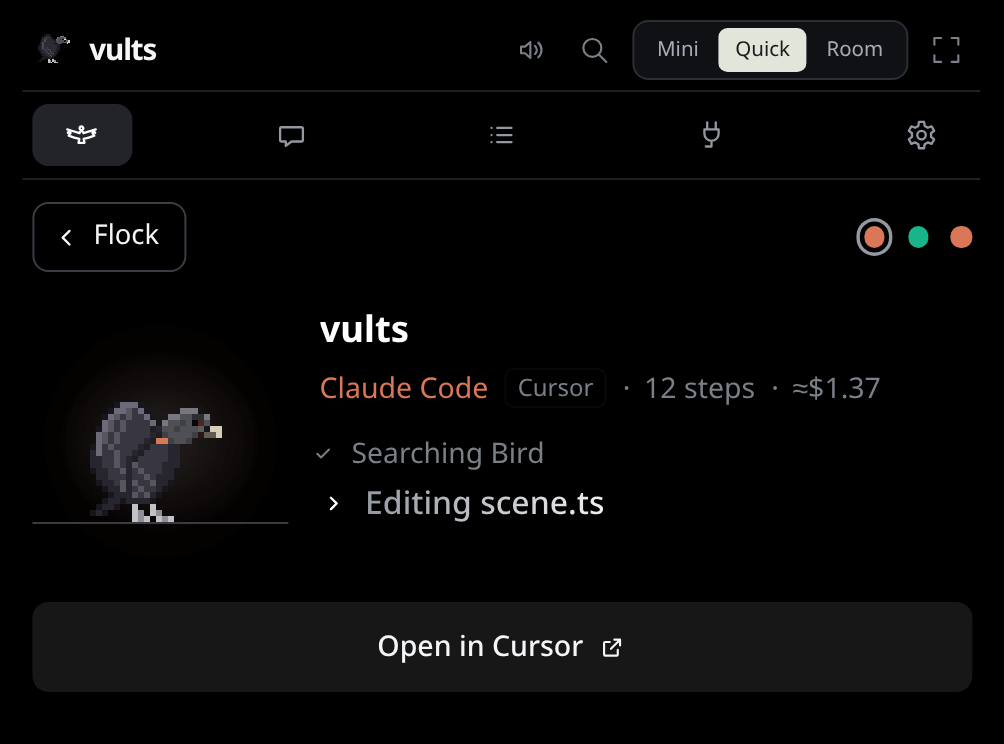
Open terminal on its card brings its terminal forward:
- a herdr, tmux, kitty or wezterm pane, on any desktop (kitty needs
listen_on unix:/tmp/kittyandallow_remote_control socket-onlyinkitty.conf); - the terminal window itself, on KDE Plasma (Wayland or X11) and in any X11 session, on its own workspace and unminimized (of several windows, the one titled after the session’s folder first);
- on GNOME, Hyprland or Sway under Wayland, only a terminal running through XWayland.
When there is nothing to bring forward, the card says so. A session started in VS Code’s or Cursor’s terminal carries a VS Code or Cursor tag, and its button raises that editor instead, on KDE and in X11 sessions.
Global shortcuts work from any window:
- Ctrl+Alt+Y / Ctrl+Alt+N allow or deny the permission on screen (Approvals).
- Ctrl+Alt+J / Ctrl+Alt+K put the next or previous session in front. A waiting card stays in front; the keys choose who comes after it.
- Ctrl+Alt+V, held, talks to the chat (Speaking).
- Ctrl+Alt+1, Ctrl+Alt+2 and Ctrl+Alt+3 switch to Mini, Quick and Room.
- Ctrl+K, in the open island or the Nest, opens the palette.
- Ctrl+Alt+Space opens the island and hands it the keyboard until it folds:
- ↑ ↓ (or K J) change the session in front; Enter opens its terminal; M opens its quick actions; C opens the chat.
- Y or N answer a permission; 1 to 9 pick a question’s choice.
- Esc folds the island and gives the keys back. On Wayland it is the way back to your terminal.
Opened with a click, the island takes no keys. The shortcuts go through the desktop portal: KDE asks once, and System Settings → Shortcuts changes the keys (worth it if your editor uses Ctrl+Alt+J or K, as JetBrains IDEs do). Settings → General lists them.
Quick actions#
Right-click a vult in the pill or the flock, or a session’s card (away from Zeca) for that session’s quick actions:
- Open terminal, as above. Where the desktop can’t, it is greyed out and offers the folder.
- Open folder: in VS Code when
codeis on yourPATH, else in your file manager. Only an existing folder, by its full path, is opened, with no shell. - Activity: the session’s last eight steps, each finished edit with its diff.
- View the last diff, and Open its file in VS Code at the first changed line (or show it in the folder; a file is never run or opened with whatever handles its type).
- Keep in front, or Let the flock choose.
- Mute, Pin or Hide this project, and This project’s bird… (below).
The menu never has Allow or Deny, and does not open over a waiting card. To reach a card waiting behind another, see More than one at a time.
While you were away#
While the screen is locked (a desktop that says so through org.freedesktop.ScreenSaver, as Plasma
and GNOME do), the island rests (no animation) and connectors stop checking. Agents and
cards go on as usual.
When you unlock, or leave Paused, a line says what happened meanwhile: While you were away: 2 finished, 1 failed, 1 waits for you for 12 min. In Island it opens the island once; it stays until you dismiss it with ×. Hidden and muted projects are left out.
A quiet bird#
A session that is working and sends nothing for 5 minutes may be stuck (a command waiting for input, a hung tool). Its bird gets a grey badge: No news for 5 min. At 15 minutes the badge turns amber, one alert plays, and in Panel a notification says so. Long thinking is not flagged; any news clears it.
The card offers three answers, and none touches the agent:
- Snooze: gone for 15 minutes, then back if still quiet.
- Keep going: it is fine; the grey flag comes back only after 30 minutes, the amber one 10 minutes later.
- Dismiss: no flag again until its next prompt.
Each answer counts as news, so the bird stays on the wire (a silent one leaves after 30 minutes); after Keep going it stays until its flag could come back.
Per project: mute, pin, hide#
These choices belong to the project (its folder): every session in it follows them, now and later.
- Mute: no sounds or notifications when its sessions finish or fail.
- Pin: its sessions come first on the wire, in the pill and in the flock.
- Hide: its sessions stay off the island, the tray and the corner widget.
- This project’s bird…: picks the species for all its sessions; Automatic gives it back to the flock’s draw.
Settings → Projects lists them, and is the way back for a hidden project.
Sounds#
Short 8-bit blips when a session needs you, finishes or fails, and for connector news; softer ones when the island opens or folds and when Zeca reacts to you. The speaker button on the island, or Settings → General → Sounds, turns them off; Volume sets how loud. A card that keeps waiting sounds again, and Do not disturb silences sounds and notifications for a while: see When nobody answers.